
Getting Started with OpenUPM-CLI
This article is a step-by-step tutorial on how to install openupm-cli and manipulate the package manifest file in the terminal. It can work with various shells:
- Bash for Mac/Linux
- Git-Bash, CMD, or PowerShell for Windows.
Not a fan of a command-line tool?
If you are unfamiliar with the command-line, you can still use other installation options available on the package page.
Installing OpenUPM-CLI
OpenUPM-CLI requires Node.js v16 or above.
Let's verify the Node.js installation by printing the npm version (the node package manager where UPM is inspired from).
$ npm -v
6.13.4
It is recommended to install the openupm-cli globally so you can use it from any path.
$ npm install -g openupm-cli
C:\Users\openupm\AppData\Roaming\npm\openupm -> C:\Users\openupm\AppData\Roaming\npm\node_modules\openupm-cli\bin\openupm + openupm-cli@1.1.0
updated 2 packages in 12.177s
Let's verify the openupm-cli installation by printing the version.
$ openupm --version
1.1.0
Installing a UPM Package
The next step is creating a new Unity project, located at the path ~/Document/projects/hello-openupm.
Let's install Unity Addressable Importer, a helper package to manage addressable assets. First, you need to identify the package name.
# go to the unity project folder
$ cd ~/Document/projects/hello-openupm

# search package by keyword
$ openupm search addressable
┌──────────────────────────────────────────┬────────────────────┬────────────┐
│ Name                                     │ Version            │ Date       │
├──────────────────────────────────────────┼────────────────────┼────────────┤
│ com.littlebigfun.addressable-importer    │ 0.16.1             │ 2023-02-08 │
└──────────────────────────────────────────┴────────────────────┴────────────┘
It returns the package name com.littlebigfun.addressable-importer.
Tips
You can directly copy the install command from the package detail page of the openupm website.
Let's install the package via the add command.
$ openupm add com.littlebigfun.addressable-importer
added: com.littlebigfun.addressable-importer@0.16.1
manifest updated, please open the Unity project to apply changes
It returns that the package version 0.16.1 was added to the manifest file.
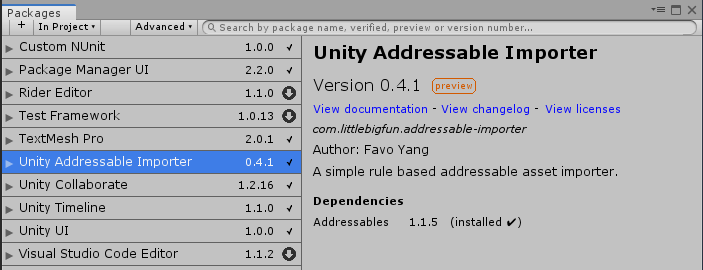
Go back to the Unity editor, wait for the package manager to resolve package changes. Then you shall see the com.littlebigfun.addressable-importer appears in the package manager window.
Understanding Manifest Changes
To understand the underlying changes of the manifest file, let's print the JSON content of Packages/manifest.json.
$ cat Packages/manifest.json
{
  "dependencies": {
    ...
    "com.littlebigfun.addressable-importer": "0.16.1"
  },
  "scopedRegistries": [
    {
      "name": "package.openupm.com",
      "url": "https://package.openupm.com",
      "scopes": [
        "com.littlebigfun.addressable-importer",
        "com.openupm"
      ]
    }
  ]
}
The openupm-cli adds com.littlebigfun.addressable-importer to dependencies. It also modified the scopedRegistries to link the com.littlebigfun.addressable-importer namespace with the openupm registry.
Please visit the openupm-cli readme for more usages.
If Unity cannot resolve the package after openupm add, compare the generated scopedRegistries entry with Unity Scoped Registry Troubleshooting.